Tuesday, 13 September 2011

Unit 1 Section 3

3.1.1

Research 4 digital artists and analysis
12/09/11-

Nico Di Mattia
Ferdie Rizkianto
Jorge Aguliar
Karina Berdnoz

Ideas and concepts:
13/09/11


Create 3 ideas, thumbnail sketches of ideas.

Present ideas and concepts:
14/09/11 – 20/09/11

Present our ideas in groups, get feedback from people and make changes.

Experimentation:
14/09/11 – 27/09/11

Experiment in photoshop using different tools. Show using screenshots how you used these tools.

Print final output:
27/09/11

3.1.2


This is a screen shot of the layers and development. Naming the layers is an important part of photohop so that you can keep track of your layers.

3.2.1/3.2.2.


This is the first stage of my design. I grabbed a crowd image form the cover of a disturbed album called ten thousand fists. I chosen the Spartan because he is a symbol of power and freedom. I got the idea from the film "300". I copied the image off of the internet and filled in with shade using an opaque black brush. I then used the mixer tool to fill in with colour. The crowd is form the over of "ten thousand fists" which fitted in with the scheme of my piece.


This is where I added the Banker/Rich man. The idea for this came from thinking who is in charge of the people. I immediately thought of a banker/government icon because they are stereotypical considered to be rich, greedy and selfish in the public eye. I drew him form scratch using a graphics tab and tried to keep into the style of the other images. I thought that this would , make the picture look more like a whole picture rather than separate images. I used a small hard brush for the outline and then shaded with a soft opaque brush. Then used the colour replacement tool to fill in with colour.


This is where I added most of the fire and piles of money. I got the money image of the internet and used the burn tool to make it look as if it was burning. I also used a scratchy brush tool and used it to erase the sides of the  money giving it the impression that it was on fire. 


Here I added the background picture which is the volcano. It's simply an image copied off a website. I also filled the background with a solid black fill to make sure that there were not any gaps in the volcano picture. I then merged they layers and put them on the bottom of the picture.


This is where is added the text "this is war". I typed the text using the text tool and then selected the font i wanted. After that I double clicked the text layer selecting the outline of the text. Then I made a new layer and filled the text in with different colour corresponding to the volcano. I then deleted the original text layer and made the coloured in text the top layer.


Original images

Feedback

This is my first draft idea of the final magazine piece. I was given feed back when we had our group dissucusion and my general feedback was good. The only feedback that I acted on was that the banker/rich man was not obvious enough. This is because the colour red and white made him look quite festive and I was not happy with that. So I decided to change the colour scheme and make him look more stereotypical. I did this by adding a bowler hat and a umbrella under his arm. I also gave him a plain dark grey suite.


This is the final and complete version. I decided to change the way that the banker/government man looked because I needed to ensure that when you see him you can identify him as that character. So I made him look more stereotypical and gave him a bowler hat, a dark suit and a umbrella so that he looks more like a banker type person.

3.3.1

I think that I did well in this unit. I grasped the concept of the design process and made sure that I completed the task on time. I took the creative criticism on board and made changes to my design to improve the presentation and style of it. 

I think that the overall the layout and presentation of my image is good. I like the way that the characters are in the same drawing style. Having found a base image of a Spartan and a background of a crowd, i drew the banker in the style which they were drawn in, making it seem like they are all in the same image. I like the way that i used colour in the photshop image. The shading and the tomes are good and something that i am particularly proud of.

I think that i Could have blended the crowd in to the picture a bit better. the background volcano image is very dark and finding the right amount of people was a struggle for the crowd. this made it hard to bled in with the whole picture.

I would improve the image of the crowd and perhaps draw it myself to make it blend in a lot better. also i would have possibly spent more time on the text, making it stand out a bit more.


Unit 1 Section 2

All Experimentation 2.1.1 - 2.2.3
This is the original image of Scarlett Johanson, which I have used in Photoshop. I have manipulated the image in diffident ways. For example using the liquidize tool, to change her facial features. 

In this image I have use the liquidize tool. This tool is used in many Photoshop images especially in photo shoots for magazine covers. this tool can allow you to change peoples features, for example whether you want them to look fatter or thinner. Also the position of their eyes, mouth, nose ect. You can have fun with this tool making people look silly, however it is also used a lot by photo manipulators to get the right look from someone or something.

In this image I used basic Photoshop tools to make a clean, well presented person who had been Photoshop, to look like they hadn't been. I used the sponge tool to take some of the colour away from her hair. I also put some cuts and bruises on to simulate realism. I also merged all the layers together, and then but a variation an the entire image. this gives the image the feel that it is all one layer.

In this picture I have used different techniques to get the final image. I used a collection of tools, for example the liquidize, to change her eyes, and also the sponge too, to give her a run down look. This will add to the affect that she is a vampire or zombie. I also used an opaque brush with red colour to simulate blood dripping down. this gives the impression of a zombie/vampire world.
For this image I created a path around the skateboarder. In order for this to be affective, you need to have an image that is an action. Not just someone standing still. I then used the stroke path tool and coloured the line in orange. then using the blending tools I created an inner and outer glow effect and played around with the features, ending up with this entire piece.


With this image I put 3 separate images into a background picture and tried to make it look as real as possible. I used a character from the game portal 2 as well as 2 portals. I also added an over all filter to the image so that all of the separate images blended in with each other. I then used the smudge tool on the portals to give the effect that they were glowing on the ground.

In this photo image, I have photoshopped a few characters into the crowd. i used the "hue/contrast" tool to adjust the lighting of the character to make them blend in with the crowd. I also added shadow to the characters and made them opaque enough so they fit in with the rest of the people.


This is a mock up image of the rich man that I intend to put into my final magazine piece. using a simple brush tool i sketched an outline of the man on a graphics tab. then  used an opaque brush with a black colour to define the shading. then I used the colour replacement tool to fill in the man with colour.

This is a work in progress bear that I intend to put into my final magazine piece. however after the group presentation i have decided not to use this image.

 This was the source image that i used in order to create a flag waving in the wind. the reason i chose this was because it has strong gradients and a cool fabric material.

This is my final flag image. I created a basic background colour using the selection and fill tool. I then added some custom images and displayed them. then i got the fabric image and resized it so it would fit this canvas. after that I changed the mode of the fabric to multiply then stuck it on the top layer of the flag image. after that I pressed control j to make the flag darker, and simply turned the opacity down to my liking.

In this image i used the custom shape tool to create a plane shape. i used the custom path tool while i was creating it so that when i selected the text tool i could type around it. I then selected the text tool and clicked on the line of the shape. I knew that this was where i wanted the text to go because the text tool icon changed when i hovered over the shape. i then text "air strike" and copied and pasted it around the rest of the shape.

In this image i created a text box and added the text "something something something dark side".i then started to play around with the character tools bar. using some of the features i managed to change the height of the words, change the font, stretch the words and increase the spacing.


In this image i created a custom shape of a stick man. i also used the wrk path tool and that allowed me to insert text in or around the picture. after i created the shape i decided to insert the text in the image by selecting the space inside it with the text tool. i then had to go to the pats tab and select the other path to do the head aswell. i then used the character tool bar to modify the text. decreasing the spacing and size gave  me a full body shape because the text could fill more space.


This is an image of three different texts that i have manipulated. using the warp text tool i chose three different styles for three different words. the i used the features to tweak them. then i selected the words and hid the text layer. i then coloured them all in with a soft brush in various different colours.

2.1.5/2.2.4


Unit 1 Section 1


1.1.1
I am going to research 4 different digital artist's that I like. the 4 that I have chosen are:
-Nico Di Mattia
-Ferdi  Rizkianto
-Jorge Aguliar
-Karina Berdnorz


1.1.2


Nico Di Mattia
In this piece of art we can see that Nico has produced a caricature version of “The Joker”. The joker is sat in an alley way of some kind sat on what appears to be an old cardboard box. Nico has presented this image as a type of caricature; we can see this because of the exaggerated features, for example, the size of the jokers head in comparison with his body.   There is a wall behind him which he has spray painted with some sort of sad face, and there is also an old, battered steel bin in front of the wall.
The artist has used a paint brush style to the whole image. This gives it more emotion and almost comic feel rather than a photograph. The dark and greasy way that the “Joker” is presented, suggest that he is a villan to somebody who does not know his character. Also the fact that he is in a dark alleyway with a spray can suggest he may be involved in a crime.
The artist has linked the character and the spray paint together by giving the character a spray can. Also the artist has linked them together by using colour. The same colour that is spray painted is also on “the joker’s” mouth.
The way that the picture is presented defiantly gives the picture some impact. The position and posture of “the joker” suggest that he is quite aggressive, at the same time he has a smile on his face giving him a sadistic and weird look. This effect would make you look at the picture twice.
We can also see that the joker has matches in his pocket, as well as having a gas canister on the floor; this brings us back to the fact that he is a criminal.


Ferdi  Rizkianto
In this image we can see that the artist has made a comic rendition on humanities effect on the planet. He has done this by using an image of a tree laid on a chopping bored with bits of it cut up. In the segments of the tree instead of bark and wood, the artist has edited them to have flesh or meat inside of them. Also he has added a stream of blood to the segments and it drips off the chopping board. There is also a knife with blood stains on it.
The artist has created a shocking picture because of the fact that it shows humans effect on the planet. For example, we presume that when we are using a chopping bored we are cutting up meat or vegetables for meals. Humans willingly take these resources with no thought, because it is normal. When we see the tree on the chopping board with segments of meet, it makes you take another look.
An in depth look at this picture tells a story of humans effect on the planet. For example the bleeding tree suggests that humans are killing them and hurting them. Another way that you could look at it would be that they are killing the environment.
The lighting effects on the tree and surroundings are good. It seems that the main light in the area is a kitchen light. Each segment has a drop shadow on it; they all face the same way which gives the picture some realism. The background of the picture is blurred making the tree and  the kitchen board the main images of the piece; this makes them stand out.
The knife has a good lighting effect in the way it is lighter at one end and darker of the other. Also the artist has remembered that the knife is a reflective surface and has reflected the chopping board onto the knife. This gives the picture a sense of realism.
Jorge Aguilar
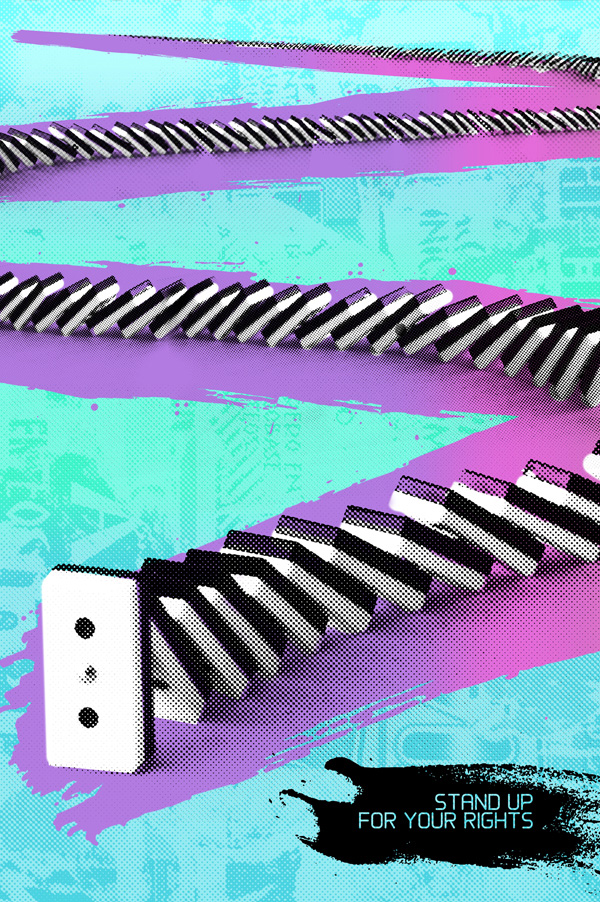
In this picture the artist has put a comic feel on standing up for your rights, what you believe in and standing up for yourself. In this image we can see the artist has arranged some dominoes in a s shape all the way into the distance. The domino at the very front of the picture has not fallen down and is still standing even though the rest of them have fallen. At the bottom right of the picture we can see that the artist has put some text there reading “STAND UP FOR YOUR RIGHTS”.
The Artist has used a colourful theme with a sky blue background and a pink path for the dominoes. This may suggest that it is aimed at women, suggesting that they should stand up for women’s rights.
This picture does not use any particular lighting effects. This is mainly because the artist has used a effect over the entire image. There seems to be some kind of affect that pixelates the image. The gives it a cool sense of style and would make it stand out in a magazine.
The fact that the domino in the front of the picture is holding up everything suggest that as an individual you must stand out from the crowd and don follow popular trend. Also that if you are pushed down by others from what you believe you should stand up for what you believe in. we cans also gather that from the way that the dominoes are all being held up by the single domino at the front that not be pushed away from the government and stand up for your rights.
This picture almost has a sort of comic effect to it because you know that the statement “stand up for your rights” is serious, the fact that it has been used in the same image as a domino that will not fall down gives it a humorous effect. Mainly because everyone knows that dominoes is a game and isn’t very serious.


Karina Berdnorz


In this photo we can see that a man or woman has just finished watering her or his garden.  They have an old watering can in their hand. The artist has photo shopped one of the flowers actually reaching out to the watering can and grabbing it with an imitation of a hand.
The lighting is very good in the picture, you can clearly see that the flower is grabbing the watering can and has a drop shadow underneath it on the water can. However you can’t pick out one on the ground. This maybe because the time of day puts the shadow too far away, however it might be a grey area. If you look closely it seems as though the sun is high in the sky, so therefore there might have to be a shadow on the ground of the plants stem.
An in depth look at this picture suggest desperation. For example, only one of the flowers is trying to grab the bucket, suggesting that one maybe a bit braver or even more in need of water. You can see that this picture is defiantly set in the summer time or on a really hot day. This means that maybe the plants are in need of more water.
This picture also has very vibrant colours suggesting that it is a summer’s day. The bright yellows and oranges suggest that the sun is out and it is a hot day. This adds realism to the picture.
This also has a shock value. If the picture was to be up on a billboard then you may look twice or three times before you actually realise what is happening in the photo. As we can all relate to it being a sunny day and being in the garden, this picture adds a comical effect to a normal scene.


1.1.3

I Demand is the concept in which our ideas have to be based around. The guidelines which we have to follow are to:
-send them in high quality, 300 Dpi, RGB, JPG.
-not include self promotion or spam
-set them to this size landscape/550 pix high by 920 pix length portrait/550 pix high by 460 pix length
-use there logo, however it is not mandatory.

Revolution Art seem to use very simplistic ideas as there front covers. using block colours and primary colours.

The theme asks what we could do to save the planet and what would we ask world leaders if we has the chance. we should discuss the government and the environment and give our view on what the majority of the population want. E.g Freedom and safety, as well as a clean and healthy environment.

The images they have used in the demo picture suggest the peoples uprising to power. It suggest unity in people and that its time for a change.


Mind map of ideas


Thumbnail Sketches/chosen idea/summary 


1.1.4               


1.2.1/1.2.2

I presented my ideas to a group of people. And I was given feedback.
- instead of having a shield give the Spartan a £10 note.
-the bear might be adding a bit too much to the picture
-indicating two different sides.
I decided that i would give the Spartan an note instead of a shield and also take the bear out of the picture because it might have been too much going on in the picture. 

1.2.3

My final idea would still be my preferred idea because I like the concept and i think it would really stand out in a magazine.